If you have a New York State Eppicard (otherwise called the NYS Eppicard) and would like to log into your account, we can help. If you just received your Child Support debit card, here is how to activate it. Once you activate it, you can register the card online and login. If you already have an account and have registered online, see below on how to login. If you don’t remember your login information, we have included help below:
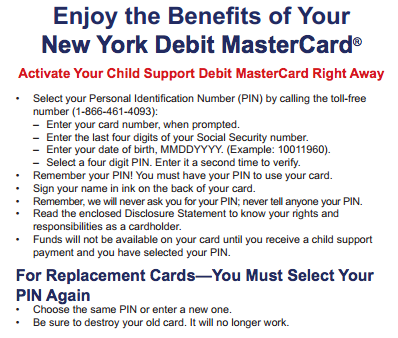
We have included an image below that will walk you through the activation process. You will need your card present with you. They will also ask for your social security number and date of birth. You then have to select a pin number, which you are going to use at the ATM or teller to get money.
If you have already activated your card and registered online, you can login to your account and check your balance information, review transactions, and get other card details, like fees, charges and customer service information. Click here to login. If you have forgotten the User ID you used when you registered online, you can click on the “Forgot User ID?” link and you will be instructed on how to retrieve your User ID.
If you have a new card that is activated, you have to register online in order to view account information online. Click here to complete that process. You can also see our full review here, including how to reach customer service.
If you are trying to check the balance of your Virginia assistance benefits, we're here…
If you're looking for help with the Way2Go Card Mississippi, you've come to the right…
If you're looking for help with the Virginia Way2Go Card, you've come to the right…
This website uses cookies.
View Comments
I have been trying to register online so I can check my card balance, but I can't. After picking a security question, answer it & pick an image, press submit, it says that there are invalid characters, but doesn't explain.
Help